Event listeners
Event listeners
What is an Event Listener?
An event listener is a callback function invoked by the browser when certain events occurs in the browser such as a mouse click, keyboard press, or touch gesture.
How It Works
Let’s break it down from the low-level details:
- The Operating System (OS) handles hardware interrupts like mouse movements, keyboard inputs, or touchpad gestures and creates an OS Event object.
- The browser window manager (e.g., Chromium) listens for these OS events and passes them to the rendering engine (e.g., Blink).
- The rendering engine performs hit testing to identify the target element and determines the path from the root of the DOM to that element.
- Finally, the JavaScript engine (e.g., V8) takes over to execute the appropriate event listeners as part of event propagation.
Hit Testing
Hit testing is the process of identifying which DOM element should receive the event. The rendering engine traverses the DOM to determine which stacking context lies under the pointer.
After filtering stacking contexts, the engine selects the topmost visible element in that context as the target element.
Elements with the following properties are ignored:
visibility: hiddendisplay: nonepointer-events: none- and similar styles that prevent interaction
Manual Hit Testing
You can manually perform hit testing using:
document.elementFromPoint(x, y)Returns the topmost element at the specified point.document.elementsFromPoint(x, y)Returns all elements under the point, sorted from topmost to bottom within the stacking context.
Event Path Construction
The browser constructs a path from the root (window) to the target element (node). Since the DOM is a tree structure, there is only one unique path. You can access this path using:
event.composedPath()Returns an array representing the event’s propagation path.
Event Propagation
Event propagation is the process of traversing the event path in two directions:
- From root to target (top-down)
- From target back to root (bottom-up)
There are three distinct phases:
- Capture Phase The event travels from the window down to the target.
- Target Phase The event reaches the target element.
- Bubble Phase The event bubbles back up from the target to the window.
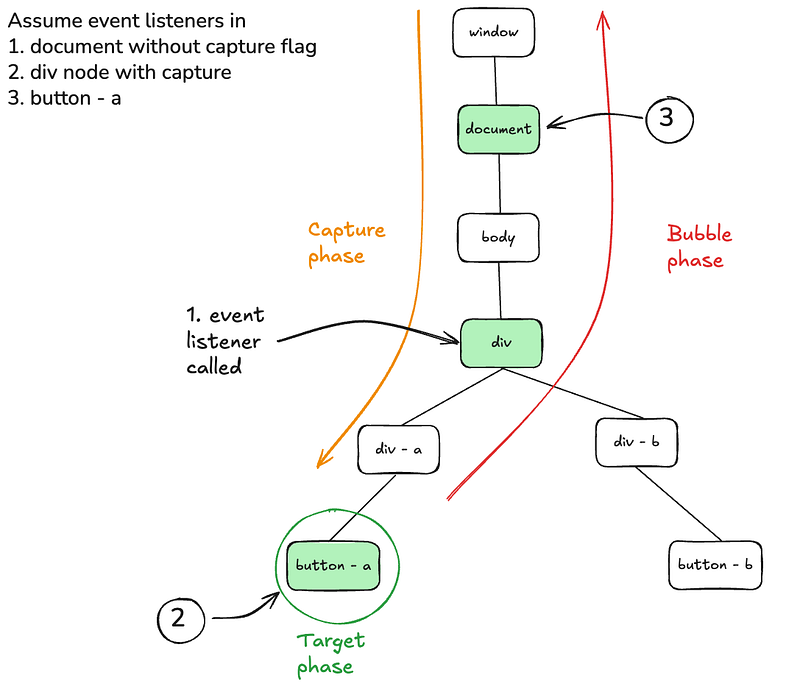
Event propagation
Capture Phase
The capture phase refers to the traversal of the event from the root node to the target element. All elements in the path are visited in the capture phase, but only listeners registered with {capture: true} are executed. Other listeners without this flag will be executed in the bubbling phase.
document.addEventListener('click', () => console.log('parent clicked'), {
  capture: true
});
In this example, we’re telling the browser to invoke the event listener during the capture phase, before the event reaches the target element.
Target Phase
The target phase occurs when the event reaches the actual target element. This is where the event listener on the target node gets executed.
Bubble Phase
The bubble phase is the traversal of the event from the target element back up to the root. If any ancestor nodes have the same event listener registered (but not executed during the capture phase), they will now be called in reverse order of the DOM hierarchy.
Lets see the event propagation in action.
<!DOCTYPE html>
<html lang="en">
<body>
    <div id="root">
        <div id="parent">
            <div id="child">
                <h1>Hello World</h1>
            </div>
        </div>
    </div>
</body>
<script>
    const root = document.getElementById('root');
    const parent = document.getElementById('parent');
    const child = document.getElementById('child');

    child.addEventListener('click', () => {
        console.log('child clicked');
    });
    parent.addEventListener('click', () => {
        console.log('parent clicked');
    });
    root.addEventListener('click', () => {
        console.log('root clicked');
    });
</script>
</html>
when “Hello world” is clicked, the console output will be
child clicked
parent clicked
root clicked
Explanation:
- Capture Phase: No event listeners have the
captureflag enabled, so nothing is executed. - Target Phase: The event listener on the
childnode (the target) is executed. - Bubble Phase: The event bubbles up to
parentand then toroot, triggering their respective listeners.
Enabling Capture on Parent
Now, let’s modify the parent listener to use the capture phase:
parent.addEventListener('click', () => {
    console.log('parent clicked');
}, {capture: true});
output:
parent clicked
child clicked
root clicked
Stopping Propagation in Capture Phase
We can also stop the event from reaching the target (or bubbling back up) by calling stopPropagation() in the capture phase:
root.addEventListener('click', (e) => {
    console.log('root clicked');
    e.stopPropagation
}, {capture: true});
output:
root clickedEven if the parent node also has a capture listener, the root node is higher in the DOM tree, so it captures the event first and stops it from proceeding further.
Event order between capture and bubble
so what happens when both capture and bubble listeners are attached on the same element?
div.addEventListener('click', () => console.log('bubble'), false);
div.addEventListener('click', () => console.log('capture'), true);
console output:
capture
bubble
If a single element has both a capture and a bubble listener, the capture listener runs before the bubble one, even though they’re on the same element.
Non-Bubbling Events
Not all events bubble up through the DOM. Below are some events that don’t participate in the bubble phase
focusblurmouseenterload
These events are intentionally designed not to bubble, often for reasons related to user experience and performance optimisation. For example, you usually don’t want a focus event on an input field to trigger focus handlers on every ancestor element.
You can check whether a specific event is capable of bubbling by inspecting its .bubbles property:
const input = document.querySelector('input');
input.addEventListener('focus', (event) => {
  console.log('Does this event bubble?', event.bubbles); // false
});
If event.bubbles returns false, it means the event does not bubble up to ancestor elements.
Event Listeners and Memory Leaks
Event listeners are a common cause of memory leaks in the web. If a DOM node is removed but its event listener is not properly detached, the reference to the node can remain in memory, preventing it from being garbage collected.
To avoid this, always remove the event listener when you remove the element from the DOM:
function handleClick() {
  console.log('Element clicked');
}
const button = document.getElementById('my-button');
button.addEventListener('click', handleClick);

// when removing the node
button.removeEventListener('click', handleClick);
button.remove(); // safe
The function reference passed to removeEventListener() must be the same as the one used in addEventListener(). Otherwise, the listener won’t be removed.
One-Time Event Listeners with once
For use cases like closing a modal or handling a one-time interaction, you can use the { once: true } option. This ensures the event listener is automatically removed after it’s triggered the first time:
document.addEventListener('click', () => {
  console.log('This will run only once');
}, { once: true });
This is a cleaner and safer approach for one-time events, and it helps reduce the risk of memory leaks.
We’ll explore real-world applications of event listeners in Part 2. Stay tuned!
By Vijayaraagavan S on July 10, 2025.
Exported from Medium on April 29, 2026.